
The Best App to Copy Text From Your Screen on iPhone
Yes, there's an app for that. iOS already has Live Text built in for free, which reads words in photos and screenshots. For text you can see live on screen, in any app, the Copiya app copies it in two taps: double-tap the back of your iPhone, tap the first word, tap the last word, and tap Copy.
"Is there an app that copies text from the screen?" comes up a lot, usually right after someone tries to press and hold on a caption, a comment or a chat bubble and gets no Copy button at all. The text is right there. You just can't select it the normal way.
There are two honest answers, depending on what "screen" means to you: a screenshot you already took, or whatever is live on your display right now. A note up front: the Copiya app is ours. We'll give you the free way first.
The built-in way: Live Text on a screenshot
Apple built text recognition into iOS itself, and it's free on iPhone XS and later. It's the closest thing to a built-in "copy text from screen" app:
- Take a screenshot of the text: press the side button and volume up together.
- Open it from the thumbnail, or find it later in Photos.
- Press and hold on the first word until it highlights, then drag the blue handles to where you want to stop.
- Tap Copy and paste it anywhere.
Live Text also works straight through the Camera app, so you can point your phone at a sign, a label or a printed page and copy text without a screenshot at all. If nothing highlights, check that it's turned on in Settings > General > Language & Region.
The catch is that Live Text only reads a picture of your screen, not your screen itself. You have to stop, screenshot, open Photos, and drag handles across text that's often packed tightly together. For a one-off copy that's fine. For captions, comments and chat messages all day, it gets old fast.
The Copiya way: copy straight off the live screen
Copiya skips the screenshot step entirely. It reads whatever is actually on your screen right now, in any app, the moment you ask it to. After a one-time setup in the app, which turns on Back Tap for you, copying works like this:
- With the text visible on your screen, double-tap the back of your iPhone.
- Tap the first word you want.
- Tap the last word. Everything in between is selected.
- Tap Copy, then go back to your app and paste.
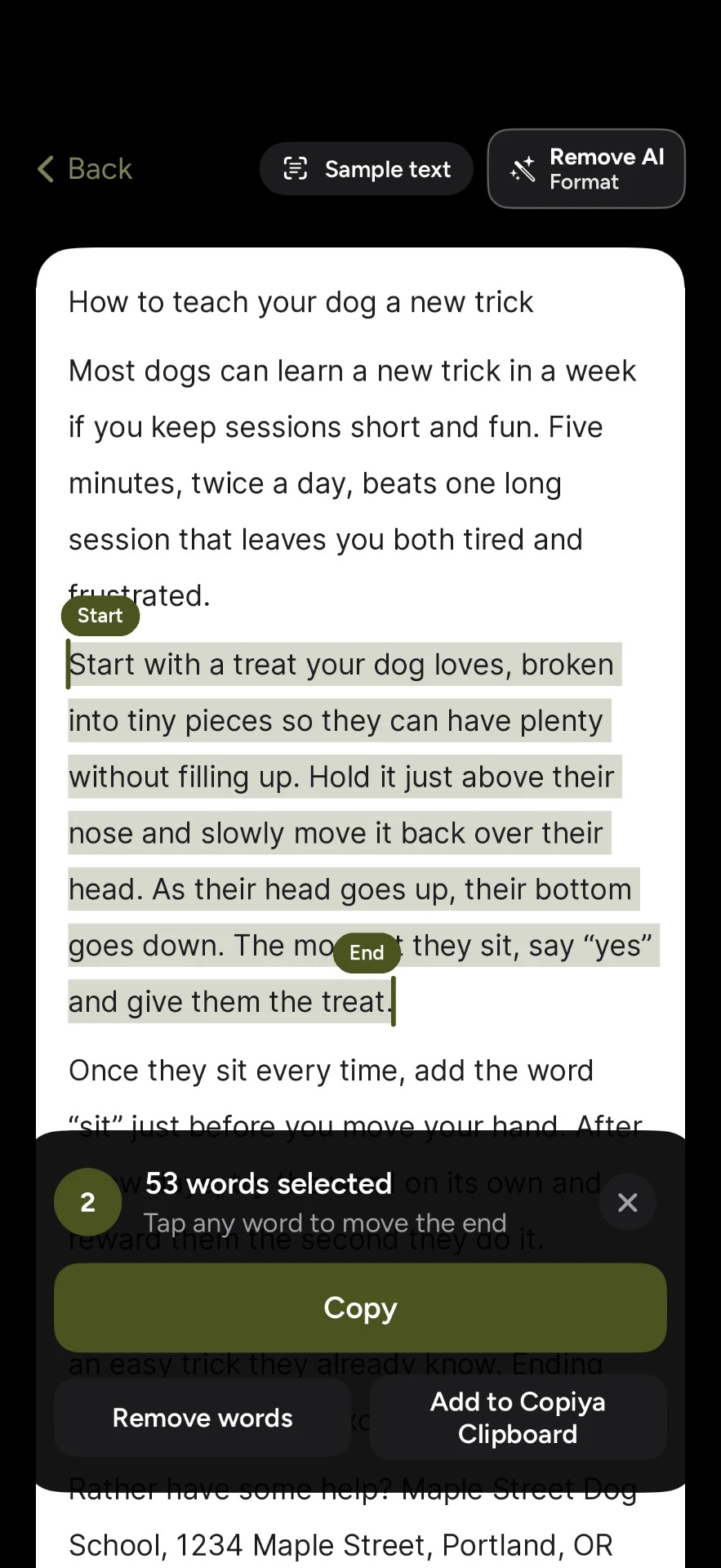
The double-tap copy is free and unlimited, there's no account to create, and Copiya reads the text on your iPhone itself rather than sending your screen anywhere. A few things that come with it:
- No screenshot left behind. Nothing gets added to your photo library just to grab a sentence.
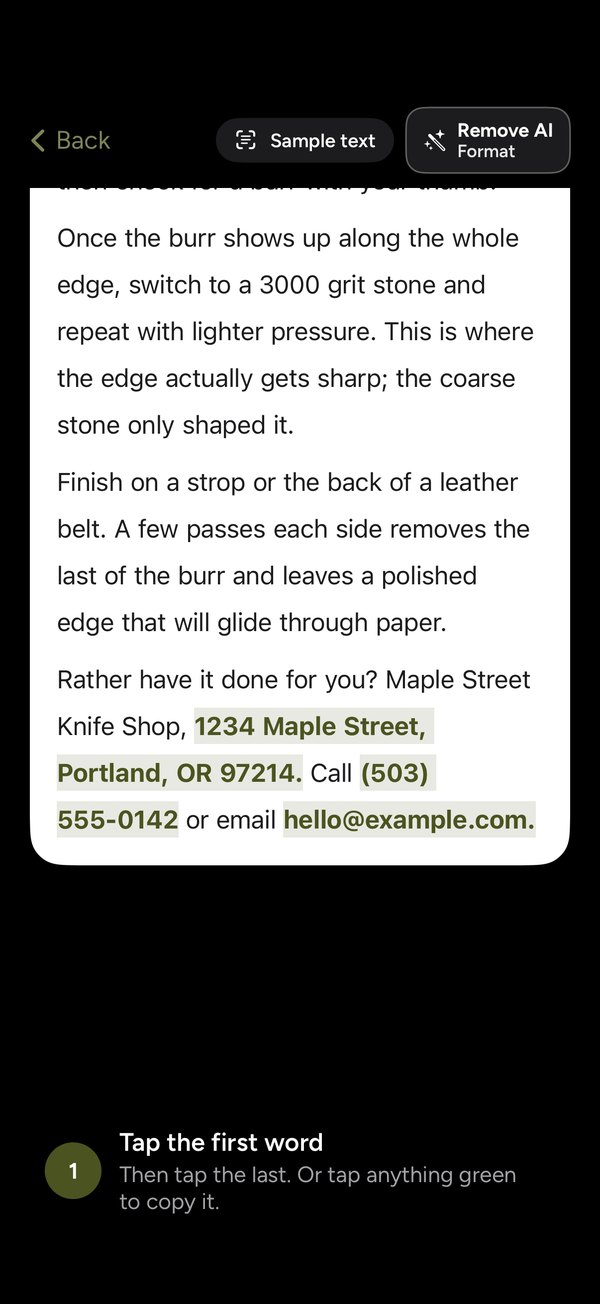
- Green tap-to-copy. Phone numbers, emails and addresses on screen show up in green, so one tap copies just that.
- Leave words out. Drop a username, a timestamp or a line in the middle before you copy.
- Remove AI Format. Turns long dashes into commas and drops AI credit lines and "Would you like me to...?" endings. It uses no AI itself.
- Safari extension. Select text on a web page, or capture a whole page as a picture, a PDF or clean text.
- Share sheet. Share a screenshot, photo or PDF to Copiya to read text out of it, and join up to 10 screenshots into one.
For a post, a chat or a set of slides longer than one screen, OverFlow in Copiya Premium captures it as text, cropped pictures, a grid or one tall picture. A triple-tap on the back saves a single screen. Premium is $2.99 a month, $19.99 a year or $29.99 once, with a 14-day free trial. Everyday copying doesn't need it.
What about other "copy text from screen" apps?
Search the App Store for this and you'll mostly find two other kinds of apps, alongside Copiya:
- Screenshot OCR apps. You import or screenshot an image and the app reads the text out of it, similar to Live Text but as a standalone app. Useful if you're on an older iPhone without Live Text, but it's still a two-step process: capture, then open the app.
- Clipboard manager apps. These keep a history of things you've already copied. They don't help with text you can't select in the first place, since there's nothing to copy yet.
Copiya is a third kind: it reads text live, on screen, in any app, without a screenshot or an import step. If you want the fuller picture of how all of these compare, see our honest comparison of copy and paste apps for iPhone.
Works on iPad too
iPad doesn't have Back Tap, so Copiya starts a different way there: add Copiya Select to Control Center (iPadOS 18 or later), or set up an AssistiveTouch shortcut. After that, it's the same tap-the-first-word, tap-the-last-word selection as iPhone.
Tips and troubleshooting
- Expand the text first. If it's hidden behind "more" or "see more," it isn't on screen yet, so neither Live Text nor Copiya can read it.
- Back Tap not responding? Tap firmly on the back of the phone, remove a thick case, or start the copy from Control Center instead.
- Fancy fonts or busy backgrounds are hard for any text reader, including Live Text. Plain text works best.
- Longer than one screen? See how to copy text from an app on iPhone that won't let you for ways to handle it in pieces or with OverFlow.
- Leave passwords and codes alone. For passwords and one-time codes, use iOS AutoFill and your password manager, not a screen-reading app.
Questions people ask
Is there an app that copies text from a screenshot?
Yes. iOS has Live Text built in for free: open a screenshot in Photos, press and hold on a word, and copy it. Standalone screenshot OCR apps do the same thing as a separate app. Copiya goes a step further and reads text straight off your live screen, so you don't need to take a screenshot first.
Is there a free app to copy text from the screen on iPhone?
Yes. Live Text is free and built into iOS on iPhone XS and later. Copiya's double-tap copy is also free and unlimited, with no account required: double-tap the back of your iPhone, tap the first word, tap the last word, and tap Copy.
Can I copy text from anywhere on my iPhone screen, not just photos?
Yes, with Copiya. It reads whatever text is visible on screen in any app, not just images. Live Text, by contrast, only reads text inside a photo, a screenshot or whatever the Camera is pointed at.
Does Apple have a built-in way to copy text from the screen?
Yes, called Live Text. It reads words in photos, screenshots and through the Camera app on iPhone XS and later. It can't read text live off your screen in other apps the way Copiya can.
Does a screen-copying app upload my screen anywhere?
Copiya doesn't. It reads the text on your iPhone or iPad itself, with no account and nothing sent off your device.