
How to Copy Text From Reddit on iPhone and iPad
Nothing is wrong with your iPhone: Reddit's own help article documents only Copy link for a post or a comment, never the words. The reliable routes are the ones iOS gives you, and the awkward case is taking one sentence out of a comment, which the reply box below solves. Readers have also reported a Copy Text item in the three-dot menu since 2019, and Copiya lets you tap the ends of a passage instead of dragging.
Open the post in Safari and select the text there, or screenshot it and read the screenshot with Live Text in Photos. Both are built into iOS, so neither depends on the Reddit app letting you select text. If you only want part of a comment, the reply box below is the quickest trick.
Why you can't copy text in the Reddit app by holding a word
Touch and hold a word and the thing you are reading can fold up instead of starting a selection. That is what the author of an r/help thread from August 2024 describes: trying to highlight a small amount of text in the app and having it collapse the post instead.
What Reddit documents is one step list per share type. Its help article How do I share Reddit content off Reddit?, updated September 15 2026, has one step list for sharing a post and one for sharing a comment, and both end in Copy link. That article does not document copying body text and does not name a Copy Text option. So the honest order is the two iOS routes first, then the in-app shortcut readers pass around.
Open the thread in Safari
A Reddit thread is an ordinary web page, and text on a web page selects normally. Tap Share on the post, then Copy link. Paste the address into Safari's address bar, then touch and hold a word and drag the grab points over what you want.
If the page gives you nothing to grab, switch it. Apple's Customize your Safari settings on iPhone words the step as "Tap Request Desktop Website (if available)," reached from the Page Menu button on the left side of the search field. A page you view signed out may show you less than the app does.
Read it off the screen with Live Text
When nothing selects, a screenshot turns the words into a picture that iOS reads back as text. Apple's Copy and translate text from photos on your iPhone or iPad, published May 1 2026, gives the steps and the requirement: an iPhone XS, iPhone XR or later with iOS 15 or later.
- Screenshot the post or the comment.
- Open that screenshot in Photos and tap the Live Text button in the lower-right corner.
- Touch and hold a word and move the grab points to adjust the selection. To take everything in the shot, tap Select All.
- Tap Copy.
If holding a word picks up nothing, that Apple page says to open Settings, tap General, then tap Language & Region and turn on Live Text. This route reads only what is on screen, so an entire post whose body runs past the fold takes more than one shot. Copiya's share sheet joins up to 10 screenshots, which is one way to keep that set together. It is the method behind copying text from an app that will not let you.
The in-app shortcut: Copy Text in the three-dot menu
Readers have pointed at the same menu item for years, in r/shortcuts in December 2019, r/help in August 2024, r/NewToReddit in January 2025 and r/reddithelp in October 2025: open the post or find the comment, tap the three dots beside it, and look for Copy Text. Then touch and hold in a note and tap Paste.
Treat it as something to look for rather than count on. That help article does not document it, menus change between app versions, and it takes the entire post or the entire comment with no way to stop halfway.
Copy only part of a comment: the reply box
This is the fix for the actual complaint, and it is what the r/help thread's own answers come back to. Readers describe tapping Reply on a comment and getting a box that shows the comment above the typing field, where the text selects more cooperatively than it does in the thread.
- Tap Reply on the comment.
- Touch and hold a word in the quoted text, then drag the grab points over the sentence you want.
- Tap Copy.
- Back out of the reply without sending it.
The hazard is obvious: you are sitting inside a reply box, so leave without posting. A second version of the same idea: copy the whole comment, paste it into Notes, and trim it there.
The Copiya way: tap the ends instead of dragging
Every route above either takes the whole thing or asks you to drag grab points. The Copiya app reads the words already on your screen and lets you mark where a passage starts and stops. Set it up once at Settings > Accessibility > Touch > Back Tap > Double Tap, on iPhone models that offer Back Tap.
- Open the post or comment so the part you want is on screen.
- Double-tap the back of your iPhone.
- Tap the first word of the passage.
- Tap the last word. Everything between the two is selected.
- Tap Copy, then paste it into your note.
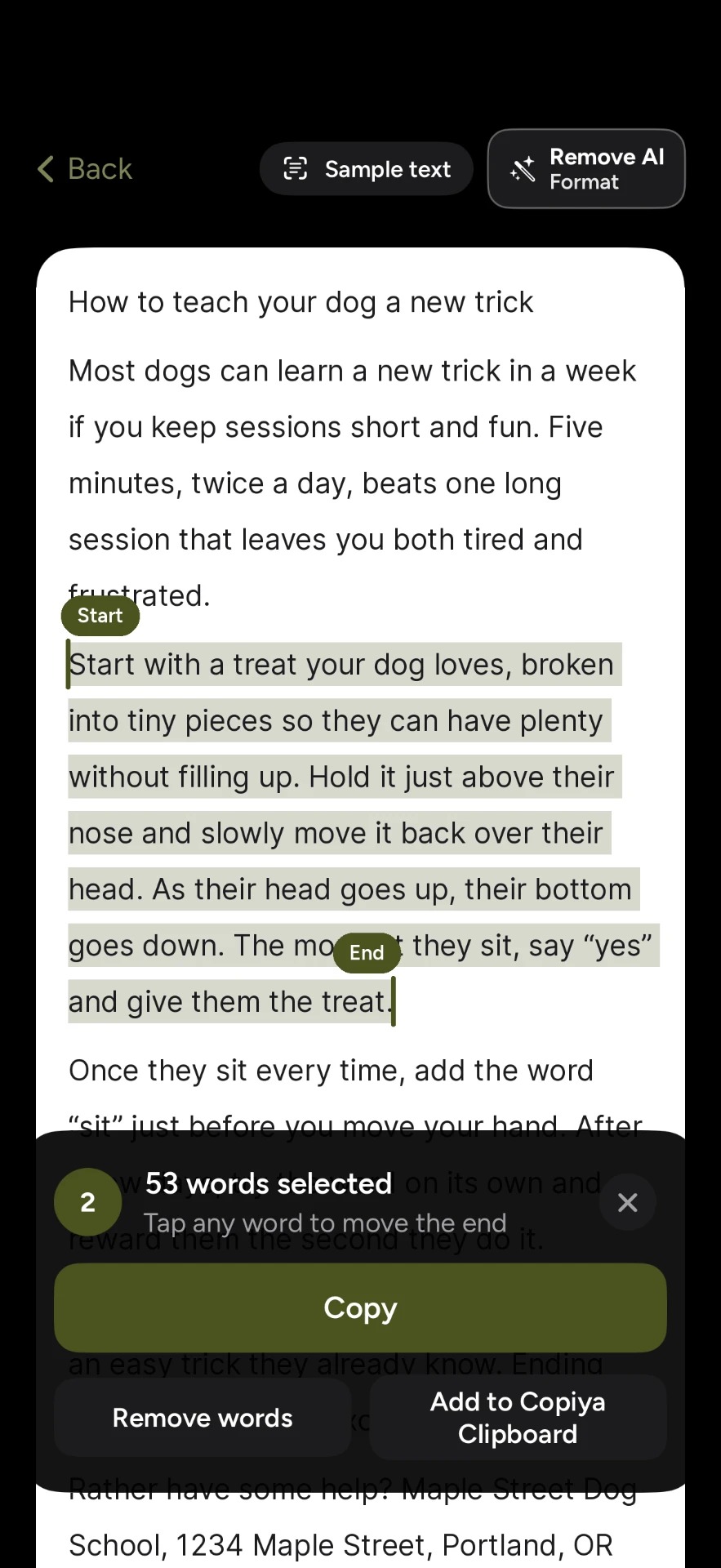
No reply box to back out of, and no screenshot to delete afterward. Leave words out drops the words you do not want from the selection, handy when a comment mixes the answer with the venting. Text copied with the Copy button goes to the system clipboard and stays there for 60 seconds, while a piece saved to Copiya Clipboard keeps until you delete it.
The free tier is 25 copies for life and Premium removes that limit, at $2.99 a month, $19.99 a year or $29.99 once, with a 14-day free trial. There is no account, and the text is read on your iPhone.
Copy an entire Reddit thread, not just one comment
A whole Reddit thread runs past one screen, and Reddit has no Copy thread button, so with the built-in routes you are gathering it:
- Free, in Safari. Open the thread on the web, request the desktop website, then touch and hold the first word and drag down past the fold. Drag toward the bottom edge and the page keeps scrolling as the selection grows, so one drag can cover several comments before you tap Copy.
- Free, in Photos. Screenshot your way down the thread and run Live Text on each shot. It does not care which app the text was in, since it only reads the picture, and it is tedious past a few screens.
- In one pass. OverFlow, in Premium, captures content longer than one screen as text, so a long post or a run of comments comes out as one block instead of a stack of screenshots. More in copying long text on iPhone.
Comments are people's own writing. Keeping a thread for your own reference is ordinary; reposting someone's answer as your own is not.
When you get the title and nothing else
- The post has no body text. Image, video and link posts can carry a title and little else, so there is nothing more to pick up. Words printed inside the image are a job for the screenshot route or the tap-the-ends route.
- Copy Text is not in the menu. Versions differ. Fall back to the reply box, Safari, or Live Text.
- You got the comment but not the replies. Each is copied on its own, so a run of them means gathering, or OverFlow in Premium.
- Selection keeps folding the comment up. That is what the reply box works around, and what tapping the ends avoids by not asking you to drag anything.
- Back Tap does nothing. Check that Double Tap is still set to Copiya, and tap firmly in the middle of the back, since a thick case can muffle the taps. If Back Tap is not in that menu, your iPhone does not have it.
- Think twice about extractor sites. Pasting a thread's address into someone else's site hands that address to whoever runs it, and an extension allowed to read the pages you visit sees far more than Reddit. Fair to ask of any extension, ours included.
If copy and paste is failing everywhere and not only in Reddit, the causes are different ones, and they are in why you cannot copy and paste on iPhone.
Copying Reddit text on iPad
Safari and Live Text behave the same on iPad: Apple's Live Text page lists the iPads it covers, with iPadOS 15.1 or later. The in-app routes depend on your app version, as they do on iPhone. With a keyboard attached you also get Command-C once text is selected, which makes the reply box less fiddly than on a phone. Start the app from Copiya Select in Control Center (iPadOS 18 or later) or an AssistiveTouch shortcut. More in copy and paste on iPad.
Questions people ask
Why can't I copy text from Reddit?
Holding a word tends to fold up what you are reading rather than start a selection, and the article Reddit publishes on sharing a post or a comment ends in Copy link rather than the words. A quick test tells you where the problem sits: if text selects normally in Notes and Safari, your iPhone is fine and the app is the obstacle.
How do I copy text on the Reddit mobile app?
Prefer the Safari route when you want the formatting of a code block or a quote to survive the trip, because text read back off a screenshot arrives as plain words. Otherwise tap the three dots beside the post or the comment and look for Copy Text, and if your version does not have it, screenshot the post and tap the Live Text button in Photos.
How do I copy all the text from an entire Reddit thread?
The detail that catches people out is that the system clipboard holds one thing at a time, so paste each piece before you take the next. Reddit has no Copy thread button, so on the web, drag toward the bottom edge and the page keeps scrolling as the selection grows, which gets you several comments at once. OverFlow, in Premium, takes a whole Reddit thread in a single capture.
Can I copy just part of a Reddit comment instead of the whole thing?
Yes, and this is the awkward one. Readers' fix is the reply box: tap Reply, and if your version shows the comment above the typing field, drag the grab points across the sentence you want, tap Copy, then back out without posting. Copiya does it without the reply box: tap the first word of the passage and then the last. Check what you pasted before you quote anyone, since a half-copied sentence changes what someone said.
How do I copy and paste a Reddit post on my phone without ending up with the link?
A comment has its own link, which is the part most people miss: when you do want a link, you can point someone at one reply rather than the whole page. For the words rather than the link, use the three-dot menu, the reply box, or Live Text on a screenshot on your phone, then touch and hold in your note and tap Paste.