
Em Dash Remover: How to Remove Em Dashes on iPhone
Nothing built into the iPhone has a strip em dashes button, so the job is a find and replace in Pages, Google Docs or Word, and the only real skill in it is handling the spaces around the dash. To stop the next draft arriving full of them, put the rule in the assistant's custom instructions, and turn off Smart Punctuation if your own keyboard is making them. The Copiya app's Remove AI Format does the swap as you copy, on the iPhone itself.
The short answer
Removing em dashes is one find and replace: search your text for the long dash character (—) and replace it with a comma. No website is needed, and nothing about the job is specific to the assistant that wrote the text.
Replacing the wrong character does nothing, so start there. The em dash is —, longer than a hyphen (-) and longer than the en dash (–) that belongs in number ranges. Copy it from this page before you search.
| Route | Best for | Where the text goes |
|---|---|---|
| Find and replace in Pages, Google Docs or Word | Text you already have | Stays in the document, which Docs and Word also sync to their own cloud |
| Custom instructions in the assistant | Stopping the next draft | Not applicable |
| Smart Punctuation off | Dashes your own typing creates | Stays on the device |
| Remove AI Format in the Copiya app | Text you are copying off a screen | Stays on the iPhone, no AI used |
| An online em dash remover | Text you were going to publish anyway | Sent to someone else's server |
Why AI writing is full of em dashes
The usual explanation is the training material: models learned from professionally edited prose, where the em dash is a normal joint between clauses, and they overuse the habit, which is how a short paragraph ends up with three. The punctuation itself is correct. What changed is that readers now read a run of long dashes as a tell.
How to remove em dashes from ChatGPT, Claude and Copilot
The cheapest fix stops the next draft instead of cleaning the last one. Each assistant has a field for standing instructions that applies to every new chat, and that is where the rule belongs: a line typed into one conversation is forgotten by the next. In ChatGPT it is Custom instructions. Claude and Copilot each have their own version of the same thing in settings, under personalization or preferences. We did not check those two labels this week and they move between releases, so look for the setting that says it applies to every chat rather than for an exact name.
Wording that holds up better than "no em dashes" names a replacement, since the sentence still needs something where the pause was:
- The standing rule: "Never use em dashes. Use commas, periods or parentheses instead."
- The one-off prompt: "Rewrite the text below with every em dash replaced by a comma, a period or parentheses. Change nothing else."
Expect this to reduce rather than guarantee. OpenAI's chief executive said in November 2025 that ChatGPT would finally obey a custom instruction telling it to drop the em dash, and the reporting that day was careful to describe it as more control over how often they appear rather than a switch that removes them by default. We could find no assistant whose maker documents a setting that removes them permanently, so set the rule, then read the output.
If the text is already written, skip this: asking an assistant to clean its own draft leaves you rereading it for changes you did not ask for.
Find and replace: how to replace em dashes on iPhone and iPad
This is what the remover sites are competing with, and it takes about twenty seconds.
Get the spacing right first
Dashes turn up in two shapes: word — word with a space on each side, and word—word with none. Search for the shape your text actually uses, and keep a space in the replacement:
- Spaced dash: search for " — " and replace with ", ", a comma and one space.
- Tight dash: search for "—" and replace with ", ".
Getting this wrong is why cleaned text comes back odd. Search the bare dash in text that has spaces around it and you get "word , word", a space before the comma and two after. Search the spaced version and replace it with a bare comma and the words close up into "word,word".
Pages
Apple's steps in its Pages for iPhone guide are to tap the More button, tap Find, tap the Search Options button, then tap Find & Replace. Put the dash in the top field and your replacement in the bottom one, then touch and hold Replace and tap Replace All. Apple warns that leaving the bottom field blank deletes every instance of what you searched for: useful for cutting a repeated AI credit line, and the reason a blank field is wrong for a spaced dash.
Google Docs
Google's Docs Editors Help for iPhone and iPad gives More, the three dots, then Find and replace. Type the dash, tap Search, tap Replace with, enter your replacement, then tap All to do the lot at once.
Word
Microsoft's mobile Office help covers Word on iPhone and iPad: tap Search at the top right, choose Find, tap Options, then pick Find and Replace or Find and Replace All. That is where a document full of long dashes gets cleaned in one pass. The same page says PowerPoint on iPhone and iPad has no find and replace at all, so a slide deck means cleaning the text in Word and pasting it back.
Notes
Notes is the gap. Apple documents Find in Note and nothing called replace, so a note full of dashes means tapping through the matches by hand or moving the text into one of the apps above.
What to put in their place, in the order that usually reads best: a comma for an aside, a period when the words after the dash stand alone as a sentence, parentheses for a true aside, and a colon when the dash was introducing something. Swapping every dash for a comma in one pass, then fixing the few sentences that now run on, is faster than deciding case by case.
How to disable the em dash on iPhone itself
Sometimes the dashes are not the assistant's. Your iPhone makes them. Apple's Pages for iPhone guide describes the behavior: the device "automatically converts double hyphens (--) to dashes (—) and converts straight quotation marks to curly quotation marks as you type", and Apple notes the setting applies to other apps on the device that you use to enter text.
The switch is Settings > General > Keyboard > Smart Punctuation. Two things before you flip it. Apple states that changing the setting does not affect dashes already in your text, only new text you type, so it prevents rather than fixes. And one switch covers both behaviors, so turning it off also gives you straight quotation marks. Apple's tip is to turn it off, type the passage, and turn it back on.
The Copiya way: Remove AI Format as you copy
Find and replace assumes the text is already in a document. Often it is not: it is on a screen, in a chat, and the cleanup belongs on the way out. That is what Remove AI Format in the Copiya app does. It turns long dashes into commas, drops the AI credit lines and the "Would you like me to...?" ending, and uses no AI of its own, so nothing is quietly rewritten.
Set the trigger once in Settings > Accessibility > Touch > Back Tap > Double Tap and choose Copiya there. Then, with the text on screen:
- Double-tap the back of your iPhone.
- Tap the first word you want, then tap the last word.
- Tap Remove AI Format, then tap Copy and paste it where it is going.
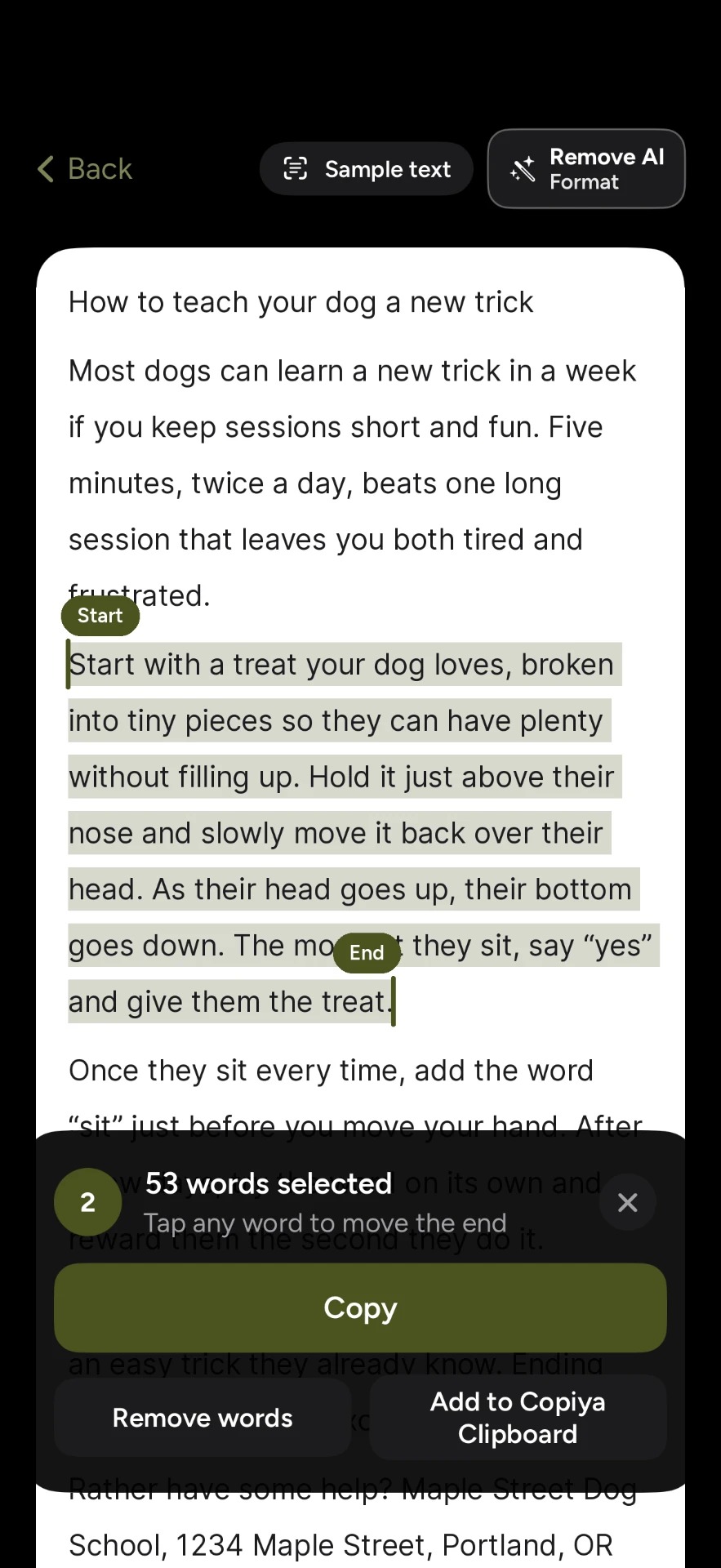
Because you mark where it starts and stops, you can lift one answer out of a long chat rather than the whole screen, and Leave words out drops something inside that span. Your first 25 copies are free (Copiya Premium is unlimited), the text is read on the iPhone itself, and there is no account to make. Text you copy with Copiya stays on the clipboard for 60 seconds, and pieces you save to Copiya Clipboard are kept until you delete them. On iPad there is no Back Tap: start it with Copiya Select in Control Center (iPadOS 18 or later) or an AssistiveTouch shortcut.
For a whole conversation rather than one answer, the routes are in how to copy an entire ChatGPT conversation on iPhone, which also covers the stray asterisks and hash marks that are markdown rather than dashes.
Before you paste your draft into an em dash remover site
When we checked US results in November 2026, the first page for em dash remover was almost all free tool pages, several branded as AI em dash removal or as a ChatGPT em dash remover. They do the job, and for a line you were going to publish anyway there is nothing wrong with one. Two things first.
- The text leaves your device. A web form sends the draft to a server you do not control, and the page may not say what happens to it next. A client brief or anything under an NDA is not text to hand over when find and replace does the same job where it sits.
- On the ones we read, a character swap is all that happens. What comes back is the dash replaced and the spaces tidied, the same operation you just ran in Pages.
For how the apps that do this kind of work on the iPhone compare, see the best copy and paste apps for iPhone.
Will removing em dashes beat an AI detector?
Treat it as a style fix, not a disguise. Punctuation is a weak signal next to what detection tools actually weigh, so stripping dashes out of an AI-written paper changes very little. They are unreliable in both directions too: independent testing keeps finding false positives on human writing, worst for people whose first language is not English, which is why some universities stopped leaning on them.
The honest reason to remove em dashes is that three in one paragraph reads like nobody edited it. Fix that and the writing is better whoever wrote it.
Gotchas worth knowing
- The clipboard holds one item. Paste each piece before you copy the next, which is the rule behind most copy and paste trouble: see how to copy and paste on iPhone.
- Text that will not select at all is a different problem, with its own fixes in why can't I copy and paste on iPhone.
- Typing one on purpose. Apple documents that touching and holding a key shows the characters related to it, using the e key as its example, and never covers the hyphen key, so expect to try it rather than read about it.
Questions people ask
How do I get rid of em dashes in a PDF or a screenshot?
You cannot search text that is a picture, so the words have to come out first. On an iPhone, Live Text pulls text out of an image, and a copy app lifts it off the screen. Once it is in a document the find and replace pass is the same as any other. A PDF that holds real text rather than a scan will let you select and copy the text out, which is the step people skip before wondering why nothing matches.
Does turning off Smart Punctuation stop an assistant's em dashes?
No, and it is worth being clear about why. That switch governs the keyboard on your device, and text an assistant wrote never passed through your keyboard: it arrives with the characters already in it. Turn it off for the drafts you type yourself, and keep find and replace for everything that comes in from somewhere else.
Do I need to remove en dashes too?
Usually not, and a blind swap will do damage. The en dash belongs in ranges like 2026–2027 and in scores, where a comma makes nonsense of it. If an assistant has used en dashes as sentence punctuation, handle those by stepping through the matches rather than with Replace All.
How do I remove em dashes in Word or Google Docs on a computer?
Same idea, bigger dialog. Both desktop apps have a replace box that accepts a pasted character, so copy a dash out of the document itself rather than typing one, and the spacing rules above still decide what you search for. The steps on this page are the iPhone and iPad versions of those apps, where the same controls sit in different menus.
Why does my em dash remover prompt change the rest of the writing?
Because a request to fix punctuation reads to a model as an invitation to edit. The sentence that stops it is the one forbidding everything else, and the giveaway that you needed it is a paragraph that comes back shorter than it went in. If you are sending that prompt more than once a week, it belongs in the standing instructions instead.