
iPhone Clipboard History: Can You See What You Copied? (iOS 27)
No, iPhone doesn't have a clipboard history, and iOS 27 didn't add one: the clipboard holds only the last thing you copied, and each new copy replaces it. You can see that last copy by pasting it, save copies to a note with a free Shortcut you run after copying, use a clipboard manager app, or select text with the Copiya app and save the pieces you need to Copiya Clipboard for 24 hours.
Every iPhone works this way, including iPhone 15, 16 and 17, on iOS 26 and iOS 27. There's no built-in clipboard viewer, no list in Settings and no hidden gesture. Below is what iOS does keep, how to get an earlier copy back when you can, and the real ways to have a history from now on.
Does iPhone have a clipboard history?
No. Apple's only built-in clipboard history is on Mac: macOS 26 Tahoe added one inside Spotlight, but iOS 27 and iPadOS 27 (released in September 2026) didn't bring it to iPhone or iPad.
What iOS 27 did add is a paste suggestion above the keyboard: after you copy something in one app and switch to another, it offers that copy so you can paste it quickly. It only offers your most recent copy, so it's a faster paste, not a history.
Privacy rules also limit what apps can do. iOS doesn't let apps read the clipboard in the background, so no app can quietly log everything you copy. That's why every clipboard app on iPhone needs you to send copies to it.
How to see what's on your iPhone clipboard right now
You can only ever see the current item. Three ways, fastest first:
- Paste it somewhere harmless. Open a new note in Notes, tap the page, tap the cursor and tap Paste.
- Try the Adjust Clipboard shortcut. Open the Shortcuts app, tap Gallery and search for Adjust Clipboard. Gallery shortcuts change over time, but this one is meant to show what's on the clipboard and lets you edit it. If it isn't listed, build the two-action version below.
- Build a two-action shortcut. In Shortcuts, tap +, add Get Clipboard, then add Quick Look. Add it to your Home Screen and tap it to preview whatever you last copied.
Can you get back something you copied earlier?
Not from the clipboard. Once a newer copy replaces it, iOS has no way to restore it, and no setting, backup or restart brings it back. These are the places the text often still lives:
| Where you copied it from | Where to look |
|---|---|
| A web page | Safari: check your open tabs, then your browsing History |
| A text message | Messages: use the search field in the conversation list and type a word you remember |
| A note you deleted | Notes: the Recently Deleted folder (Apple keeps deleted notes there for 30 days) |
| Text you cut (not copied) in an app that's still open | Undo the cut: swipe left with three fingers, or shake the iPhone and tap Undo (in most apps, and usually only while the app is still open) |
| Something copied on your Mac | On macOS 26 Tahoe, press Command-Space bar to open Spotlight, then press Command-4 to search the Mac's clipboard history |
How to keep a clipboard history on iPhone (2 ways)
1. A free Shortcut that saves copies to a note
- In Notes, create a note called Clipboard History.
- In Shortcuts, tap + and add Get Clipboard, then Append to Note, and choose the Clipboard History note.
- Name it Save Clipboard and add it to your Home Screen, or ask Siri to run it by name.
Run it after each copy you want to keep, and the note becomes a running list you can search. Want a time on each entry? Add Current Date and a Text action that combines the date with the clipboard, and append that Text instead. On iPhone models with an Action button, you can make saving one press: go to Settings > Action Button, swipe to Shortcut and choose Save Clipboard.
Two catches. It saves only when you run it, because iOS has no automation that fires every time you copy. And don't run it after copying a password or a code: the note keeps everything in plain text.
2. A clipboard manager app
Clipboard apps from the App Store keep a searchable list, and some add pinned snippets or sync with a Mac app. They work within the same iPhone rule: you add a copy by opening the app, sharing to it from the share sheet, or copying through its keyboard. Custom keyboards usually ask you to turn on Allow Full Access, which lets a keyboard use the network, so read its privacy policy before turning it on. If you've searched Reddit for this, these are the options people usually suggest: a Shortcut you run, a keyboard with a clipboard, or a manager app you share to. Our honest comparison of copy and paste apps covers what to look for.
The Copiya way: save the pieces you need for 24 hours
If what you want is to keep a few pieces handy for a day, the Copiya app does that. Copiya Clipboard isn't a log of every system copy; it holds only the pieces you save with Copiya. Copiya reads the words on your screen, so it works in most apps, including many that won't let you select text. After you set Back Tap to Copiya (Settings > Accessibility > Touch > Back Tap > Double Tap):
- Double-tap the back of your iPhone with the text on screen.
- Tap the first word you want.
- Tap the last word. Everything in between is selected.
- Tap Copy to put it on your clipboard so you can paste it right away (it stays there for 60 seconds), or tap Copy to Copiya Clipboard to save the piece for later.
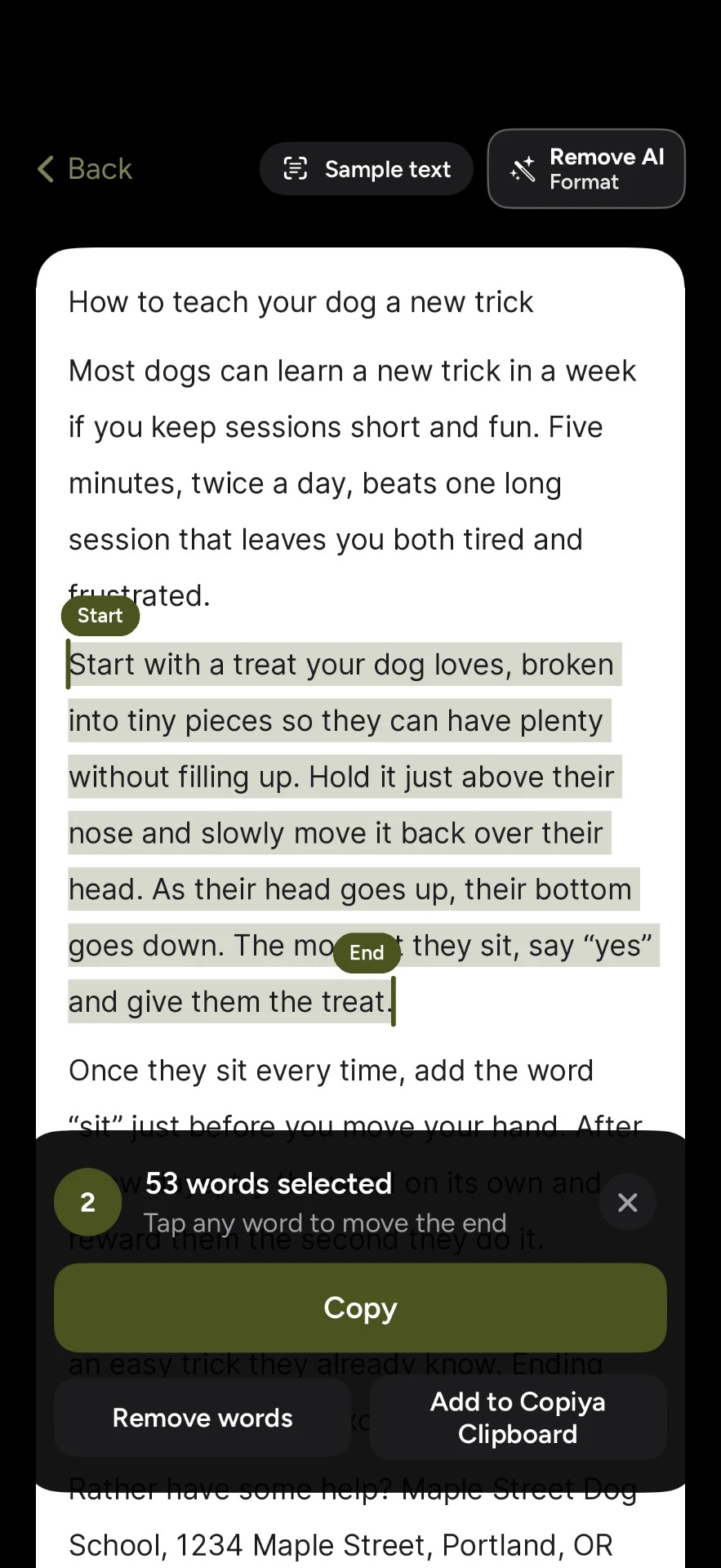
Save an address from one app, a phone number from a message and a quote from a post to Copiya Clipboard, and each piece waits there for 24 hours, so you can copy each one out when you need it. Double-tap copy is free and unlimited, needs no account and reads text on your iPhone itself. Phone numbers, emails and addresses show in green so one tap copies just that, and you can leave out words you don't want. On iPad, start Copiya with Copiya Select in Control Center (iPadOS 18 or later) or an AssistiveTouch shortcut.
iPad clipboard history
iPad works the same as iPhone on every iPadOS version, including iPadOS 27: one item, no history, whether it's an iPad Pro, Air or mini. The same Shortcut works on iPad, and clipboard apps work the same way there as on iPhone. Universal Clipboard can move your latest copy between your iPhone, iPad and Mac, but it carries only that one item; see copying between iPhone and iPad. For the basics, start with how to copy and paste on iPhone, and for the Mac keys, copy and paste shortcuts for iPhone, iPad and Mac.
Questions people ask
Does iOS 26 have clipboard history?
No. iOS 26 keeps one item, like every earlier version. Updating to iOS 27 won't recover anything you copied before, either.
Is there a clipboard history shortcut for iPhone?
Not built in. Search the Shortcuts Gallery for Adjust Clipboard to view your current copy, or build the Save Clipboard shortcut above to log copies to a note. Neither one runs by itself when you copy.
Is there a cut and paste history on iPhone?
No. Cut uses the same single clipboard as copy, so a new cut or copy replaces it. Cutting a paragraph and then copying something else is a common way to lose text, so paste cut text before you copy anything new.
Is there a clipboard history on the iPhone keyboard?
Not in Apple's keyboard. Some third-party keyboards include a clipboard list; see the clipboard manager section above for what they need.